NL Woordvinder Wordfeud7.3.38
Publisher Description

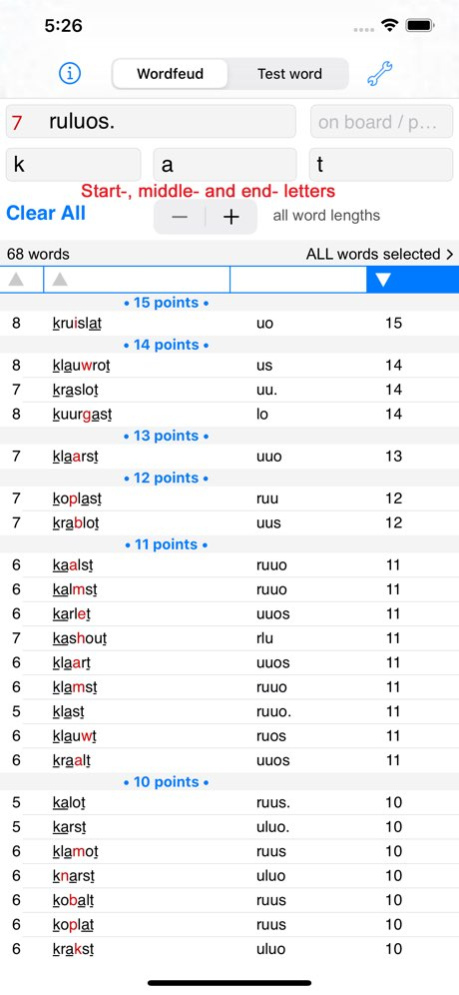


Finds words for playing Wordfeud and crossword puzzles, and teaches you words words you never knew. Sort the results on word length, alphabet, or word score. Find not the longest, but the best word! You can find words using the 7 letters you have, but also match up letters and word parts on the board.
Lookup words online or in the local dictionary with a Copy/Define/Lookup online menu.
The word length selector is handy to find words for Draw Something.
Searches are case-insensitive, and diacritic marks (accents) insensitive: you can type "geent" and "geënt" will be displayed.
New is the "Test word" option: test if a word exists, and find words with missing letters. You can use this to see if there are words that would fit a game situation, and which letters you would need. Also handy to find 2-letter combinations. Use a single dot for one missing letter, an @ sign for more. Also usable for crossword puzzles.
Slide Over: you can now use the Wordsfinder in front of another app, for example in front of Wordfeud, or a puzzle app! It requires iOS 13, and is only available on iPad.
How to use Slide Over: 1. Make sure Wordsfinder is in the Dock; 2. Open an app; 3. Swipe up from the bottom of the screen to open the Dock; 4. On the Dock, touch and hold the Wordsfinder, then drag it up, to the screen; 5. Position or left or right.
No internet connection is required, this App will still help you when you are travelling, with more than one million words included.
Privacy: no information is collected or shared with other parties.
Version History - update words
- Settings: UPPER CASE display of results repaired
- added words in dark mode are now a tad lighter
- long press of a result now displays the menu: Copy, Define, Wiktionary, Google, Alternative for online lookup 7.3.38 09/04/2024 - Fix rare crash 7.3.37 08/21/2023 - fix (rare) crash 7.3.36 08/17/2023 - added words in blue now are better visible in dark mode
- updated words list
- fix empty indexes bug
- fix rare crash 7.3.34 08/08/2023 - added words in blue now are better visible in dark mode
- updated words list
- fix empty indexes bug
- fix rare crash 7.3.32 08/04/2023 - added words in blue now are better visible in dark mode
- updated words list
- fix empty indexes bug 7.3.31 08/03/2023 - added words in blue now are better visible in dark mode
- updated words list 7.3.30 08/02/2023 Previous version allowed copy on an empty text field, causing a crash. 7.3.29 01/24/2023 - update NL words list
- fix for off font size after "slide over" to "fullscreen" 7.3.28 01/14/2023 Updated the words list to include 2- and 3-letter words of the words list of the NL Scrabblebond.nl.
This includes words like "QUE", which are not allowed in Wordfeud, currenty. 7.3.27 08/27/2021 - App now shows up to 10.000 words, to be able to find all words when using many blanks 7.3.26 07/28/2021 - Update Opentaal words list 2021
- Fix for wrong rendering of underlined text in certain circumstances
- Settings: Select a search engine for looking up words online (tap and hold a word found...): Google, Bing or DuckDuckGo
- Settings: Specify an alternative search engine URL
- App displays more words (up to 15.000) so words with many letters and blanks show proper results 7.2.25 06/26/2021 The remaining letters are now correct when using an on-board pattern. 7.3.22 12/09/2020 - A '@' in the pattern in the "on board/pattern" to match 0 or more letters now indeed matches 0 or more letters.
- macOS version 7.3.21 12/06/2020 A. The letters for "Test word" and "Wordfeud" are now independent. The letters you typed as "your letters" are different from the letters in the "Test word" tab, so you can have different words or letters in each field, looking up words does not disturb "your letters".
B. Slide Over: you can now use the Wordsfinder in front of another app, for example in front of Wordfeud, or a puzzle app! It requires iOS 13, and is only available on iPad.
How to use Slide Over: 1. Make sure Wordsfinder is in the Dock; 2. Open an app; 3. Swipe up from the bottom of the screen to open the Dock; 4. On the Dock, touch and hold the Wordsfinder, then drag it up, to the screen; 5. Position or left or right. 7.3.19 09/13/2020 - the "on board letters" field now has proper light colours for the letters in Dark Mode.
- the red letters for the blank are now lighter in Dark Mode, to improve contrast. 7.3.16 04/26/2020 - Slide Over and Split View: you can now use Woordvinder while playing Wordfeud, on the same screen, on iPads supporting that. 7.3.15 04/19/2020 - fixes crash when too many dots typed in the "on board" field, on devices with older iOS versions
- Dark mode
- update words 7.3.14 04/01/2020 - Fixes crash on startup for version 7.3.12 on devices running an older iOS (before iOS 13)
- Dark Mode 7.3.13 03/30/2020 Dark Mode 7.3.12 03/29/2020 - fixed bug for remaining letters in case of using the on-board field
- updated words list 7.3.11 03/25/2020 - removed the (blue) words that are names and abbreviations
- corrected the alignment of the score with the sort bar
- corrected the remaining letters when using the on-board letters field 7.3.10 11/06/2019 - fix for wrong underlining of parts of words in iOS13
- when switching the search mode the keyboard will remain active for the main text fields
- you can no longer accidentally type spaces in the fields begins/contains/ends, causing no results displayed
- Web links from the info pages now open in Safari
- the maximum number of words displayed now is 2500, was 1000 7.3.9 10/21/2019 - the magnifier shows the text again, while editing, on iOS 11
- a "Clear" now automatically selects the letters field, and the keyboard stays up 7.3.7 10/22/2017 Changes for iOS 11 (rotation issue) 7.3.4 10/09/2017
About NL Woordvinder Wordfeud
The company that develops NL Woordvinder Wordfeud is Rick Jansen. The latest version released by its developer is 7.3.38. This app was rated by 3 users of our site and has an average rating of 4.2.
To install NL Woordvinder Wordfeud on your iOS device, just click the green Continue To App button above to start the installation process. The app is listed on our website since 2026-10-06 and was downloaded 23 times. We have already checked if the download link is safe, however for your own protection we recommend that you scan the downloaded app with your antivirus. Your antivirus may detect the NL Woordvinder Wordfeud as malware if the download link is broken.
How to install NL Woordvinder Wordfeud on your iOS device:
- Click on the Continue To App button on our website. This will redirect you to the App Store.
- Once the NL Woordvinder Wordfeud is shown in the iTunes listing of your iOS device, you can start its download and installation. Tap on the GET button to the right of the app to start downloading it.
- If you are not logged-in the iOS appstore app, you'll be prompted for your your Apple ID and/or password.
- After NL Woordvinder Wordfeud is downloaded, you'll see an INSTALL button to the right. Tap on it to start the actual installation of the iOS app.
- Once installation is finished you can tap on the OPEN button to start it. Its icon will also be added to your device home screen.
Program Details
System requirements
Download information
Pricing
Version History
version 7.3.38
posted on 2026-10-06
Version History - update words
- Settings: UPPER CASE display of results repaired
- added words in dark mode are now a tad lighter
- long press of a result now displays the menu: Copy, Define, Wiktionary, Google, Alternative for online lookup 7.3.38 09/04/2024 - Fix rare crash 7.3.37 08/21/2023 - fix (rare) crash 7.3.36 08/17/2023 - added words in blue now are better visible in dark mode
- updated words list
- fix empty indexes bug
- fix rare crash 7.3.34 08/08/2023 - added words in blue now are better visible in dark mode
- updated words list
- fix empty indexes bug
- fix rare crash 7.3.32 08/04/2023 - added words in blue now are better visible in dark mode
- updated words list
- fix empty indexes bug 7.3.31 08/03/2023 - added words in blue now are better visible in dark mode
- updated words list 7.3.30 08/02/2023 Previous version allowed copy on an empty text field, causing a crash. 7.3.29 01/24/2023 - update NL words list
- fix for off font size after "slide over" to "fullscreen" 7.3.28 01/14/2023 Updated the words list to include 2- and 3-letter words of the words list of the NL Scrabblebond.nl.
This includes words like "QUE", which are not allowed in Wordfeud, currenty. 7.3.27 08/27/2021 - App now shows up to 10.000 words, to be able to find all words when using many blanks 7.3.26 07/28/2021 - Update Opentaal words list 2021
- Fix for wrong rendering of underlined text in certain circumstances
- Settings: Select a search engine for looking up words online (tap and hold a word found...): Google, Bing or DuckDuckGo
- Settings: Specify an alternative search engine URL
- App displays more words (up to 15.000) so words with many letters and blanks show proper results 7.2.25 06/26/2021 The remaining letters are now correct when using an on-board pattern. 7.3.22 12/09/2020 - A '@' in the pattern in the "on board/pattern" to match 0 or more letters now indeed matches 0 or more letters.
- macOS version 7.3.21 12/06/2020 A. The letters for "Test word" and "Wordfeud" are now independent. The letters you typed as "your letters" are different from the letters in the "Test word" tab, so you can have different words or letters in each field, looking up words does not disturb "your letters".
B. Slide Over: you can now use the Wordsfinder in front of another app, for example in front of Wordfeud, or a puzzle app! It requires iOS 13, and is only available on iPad.
How to use Slide Over: 1. Make sure Wordsfinder is in the Dock; 2. Open an app; 3. Swipe up from the bottom of the screen to open the Dock; 4. On the Dock, touch and hold the Wordsfinder, then drag it up, to the screen; 5. Position or left or right. 7.3.19 09/13/2020 - the "on board letters" field now has proper light colours for the letters in Dark Mode.
- the red letters for the blank are now lighter in Dark Mode, to improve contrast. 7.3.16 04/26/2020 - Slide Over and Split View: you can now use Woordvinder while playing Wordfeud, on the same screen, on iPads supporting that. 7.3.15 04/19/2020 - fixes crash when too many dots typed in the "on board" field, on devices with older iOS versions
- Dark mode
- update words 7.3.14 04/01/2020 - Fixes crash on startup for version 7.3.12 on devices running an older iOS (before iOS 13)
- Dark Mode 7.3.13 03/30/2020 Dark Mode 7.3.12 03/29/2020 - fixed bug for remaining letters in case of using the on-board field
- updated words list 7.3.11 03/25/2020 - removed the (blue) words that are names and abbreviations
- corrected the alignment of the score with the sort bar
- corrected the remaining letters when using the on-board letters field 7.3.10 11/06/2019 - fix for wrong underlining of parts of words in iOS13
- when switching the search mode the keyboard will remain active for the main text fields
- you can no longer accidentally type spaces in the fields begins/contains/ends, causing no results displayed
- Web links from the info pages now open in Safari
- the maximum number of words displayed now is 2500, was 1000 7.3.9 10/21/2019 - the magnifier shows the text again, while editing, on iOS 11
- a "Clear" now automatically selects the letters field, and the keyboard stays up 7.3.7 10/22/2017 Changes for iOS 11 (rotation issue) 7.3.4 10/09/2017
version 7.3.38
posted on 2024-09-04
Sep 4, 2024
Version 7.3.38
- update words
- UPPER CASE setting of words repaired
- added words in dark mode are now a tad lighter
version 7.3.38
posted on 2024-09-04
- update words
- Settings: UPPER CASE display of results repaired
- added words in dark mode are now a tad lighter
- long press of a result now displays the menu: Copy, Define, Wiktionary, Google, Alternative for online lookup
version 7.3.34
posted on 2023-08-08
Aug 8, 2023
Version 7.3.34
- added words in blue now are better visible in dark mode
- updated words list
- fix empty indexes bug
- fix rare crash
version 7.3.31
posted on 2023-08-03
Aug 3, 2023
Version 7.3.31
- added words in blue now are better visible in dark mode
- updated words list
- fix empty index bug
version 7.3.30
posted on 2023-08-02
Aug 2, 2023
Version 7.3.30
- added words in blue now are better visible in dark mode
- updated words list
version 7.3.29
posted on 2023-01-24
Jan 24, 2023
Version 7.3.29
Previous version allowed copy on an empty text field, causing a crash.
version 7.3.27
posted on 2021-08-27
Aug 27, 2021 Version 7.3.27
Updated the words list to include 2- and 3-letter words of the words list of the NL Scrabblebond.nl.
This includes words like "QUE", which are not allowed in Wordfeud, currenty.
version 7.3.26
posted on 2021-07-28
Jul 28, 2021 Version 7.3.26
- App now shows up to 10.000 words, to be able to find all words when using many blanks
version 7.3.25
posted on 2021-06-26
Jun 26, 2021 Version 7.3.25
- Update Opentaal words list 2021
- Fix for wrong rendering of underlined text on iOS14
- Settings: Select a search engine for looking up words online (tap and hold a word found...): Google, Bing or DuckDuckGo
- Settings: Specify an alternative search engine URL
- App displays more words (up to 15.000) so words with many letters and blanks show proper results
